
Keep context in view.
The AI drawer sits beside the work. Discuss the finding or task without rebuilding its story from memory.
Security operations for your fleet
Put your fleet findings to work with AI beside you. Understand real security problems, discuss the evidence, and build a plan to address them.
SuiteSOC brings fleet evidence, AI conversation, and accountable maintenance into one workspace. Your team makes the decisions and carries out the work.

Open the AI drawer beside what you’re viewing. Ask “What am I looking at?”, explore the evidence, and talk through a next step.
AI contributes guidance. You bring the judgment.
Compatible with
How SuiteSOC works
Understanding, discussion, action, and reflection belong together. Bring AI in when it helps, revisit the evidence, and keep each decision with the people responsible.
“What am I looking at?”
Start with the computer, finding, source, and observation time. Ask AI to explain the available context, including the current scope and what the evidence cannot tell you.
“What else should we consider?”
Ask follow-up questions. Compare possibilities, challenge an assumption, and bring your knowledge of the environment into the discussion. An AI answer is something to examine.
“What should we try next?”
Use AI to propose guidance or a plan, then review and refine it. In a maintenance task, edit a contribution before posting it to Work Progress. Suggestions do not silently change the task’s plan or flags.
“Who does what, and when?”
Give the task owners, supporting people, dates, and any required approval. People carry out authorized work through their normal tools and record what they actually try. Return to AI as the situation changes.
“Did that have the intended effect?”
Compare the reported work with available evidence. Record the result, its timing, and anything still unresolved. Creating a task or receiving an AI answer does not establish that a computer is repaired.
“What should we carry forward?”
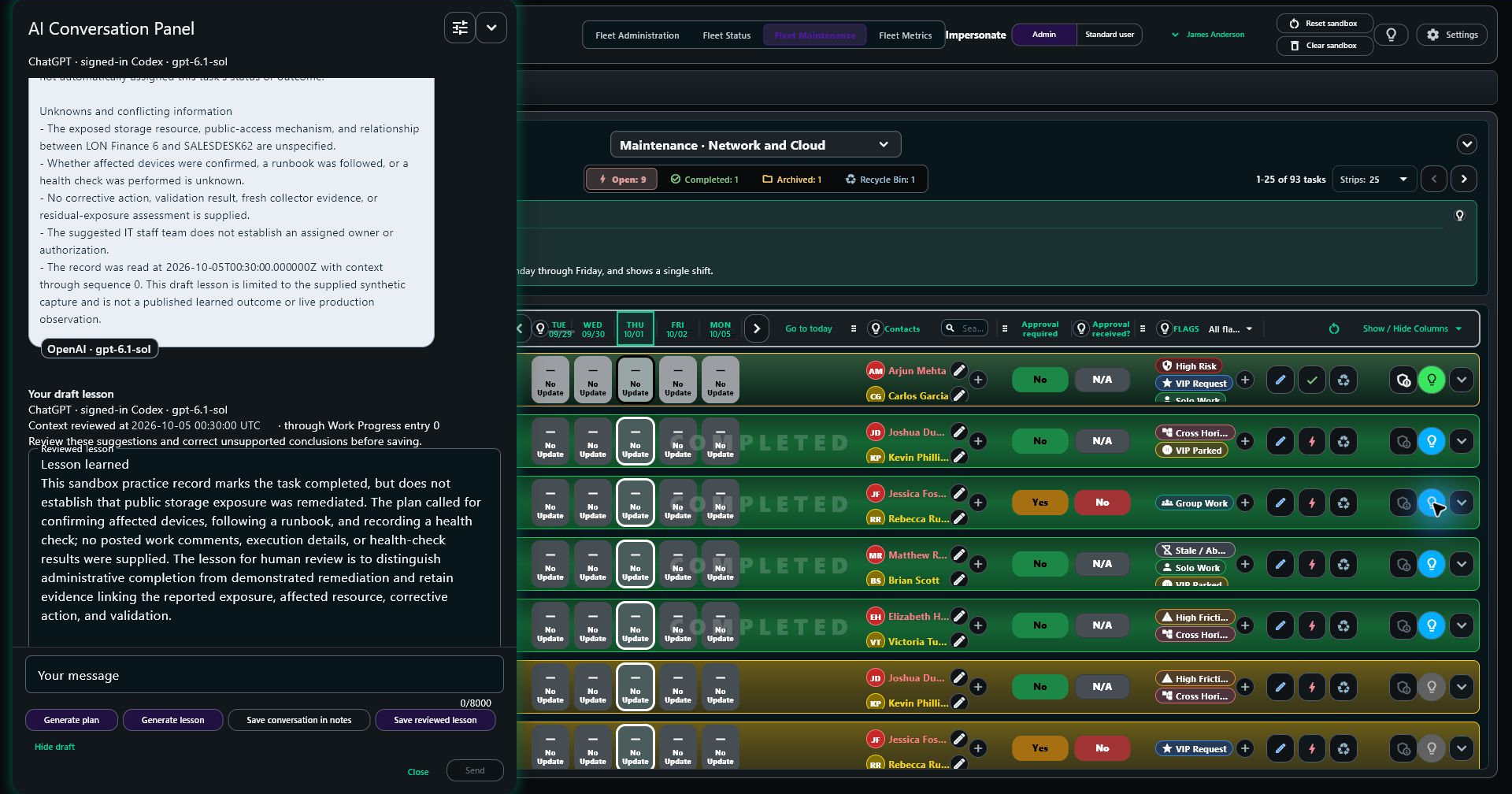
After completing the task, use Learn to draft a lesson from the record. Review and save the lesson. A SuiteSOC administrator can then review and publish a Learned Outcome. Relevant published outcomes can inform future assistance.
Example questions to guide a conversation. Responses depend on the selected AI connection and the context available.
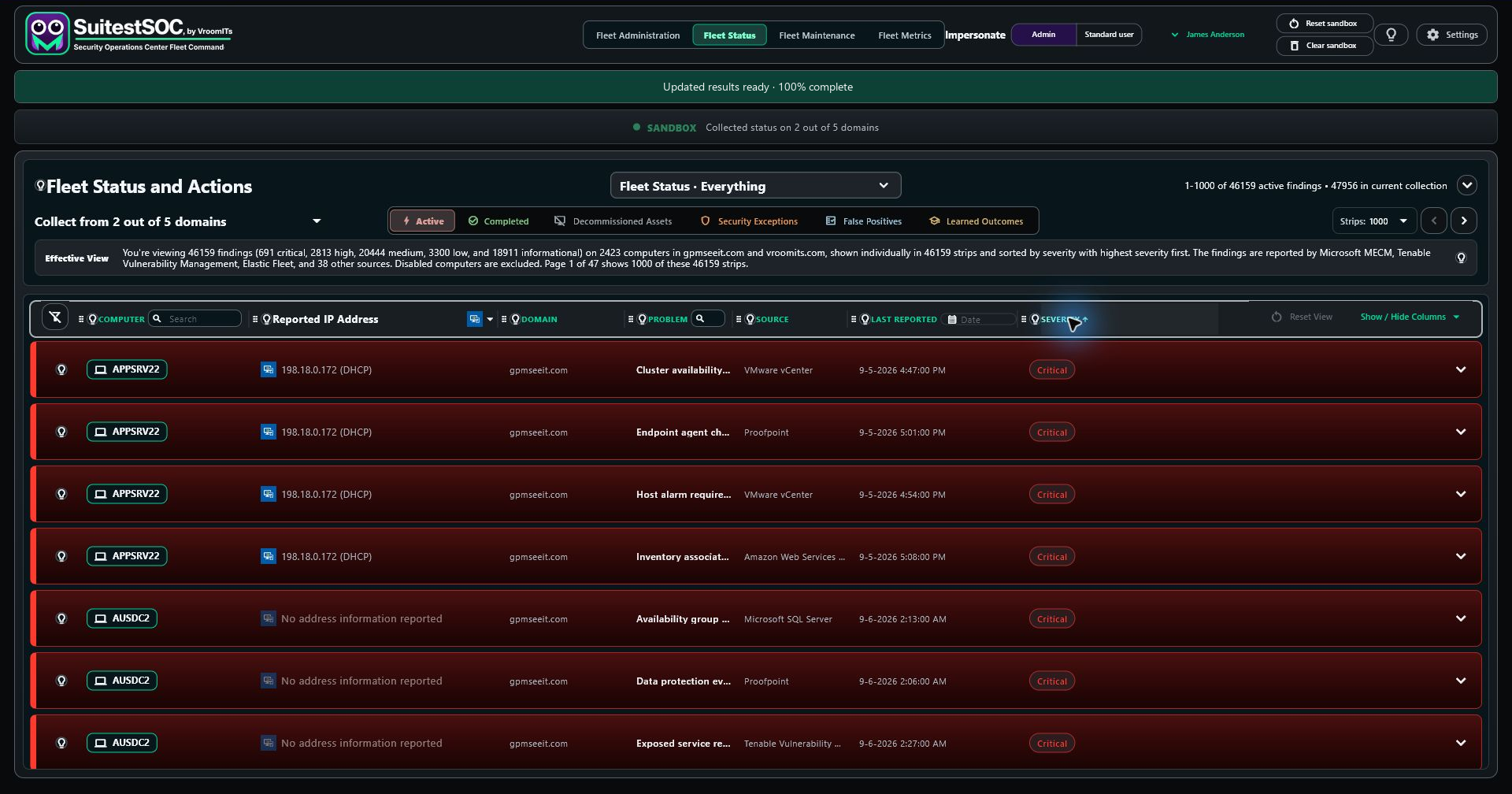
In Fleet Status, filter and search the reported findings. Keep the computer, domain and source beside the decision. Record a false positive and explain why, accept a security exception with an expiration date, or create a maintenance task. Give the task a name, description, owners, supporting people and due date.
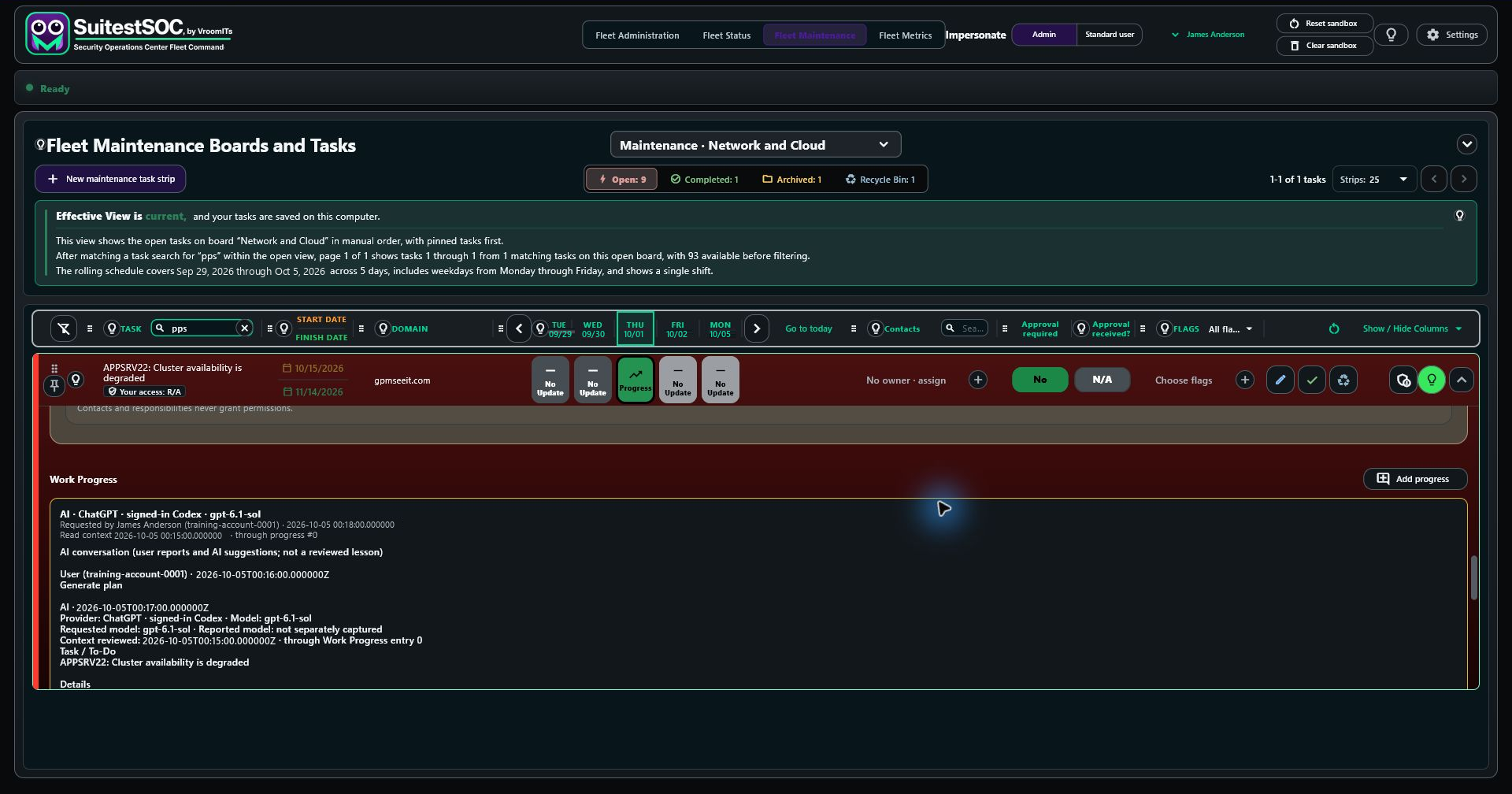
In Fleet Maintenance, ask your chosen AI for a plan, then record what people try and what happens. You can also create a task directly when a problem needs attention before a finding exists. Work Progress records who said what and when, with the newest entry at the top. Ask AI again and it reads the task, available evidence and dated conversation in sequence, then adds its assessment as another attributed comment. People remain responsible for the decisions and the fix.
Record the actual fix and result, then close the task. Learn becomes available so your chosen AI can review the plan, decisions, work and outcome. The lesson distinguishes suggestions from what people actually did and observed. A SuiteSOC administrator reviews it and publishes a Learned Outcome with a title, description, author and timestamp. Find it in Fleet Status, expand the familiar record, and carry that reviewed knowledge into future AI assistance.
Close the loop
The maintenance task is the parent of the Learned Outcome, whether it began with a fleet finding or a person. Preserve its full work history and originating finding evidence when available. When preparing a Learned Outcome, SuiteSOC gathers the available computer details: hardware, installed software, services and network information, timestamped to show when that picture was captured. If retrieval fails, save a draft or explicitly accept an incomplete capture.
False positives and security exceptions keep their reasoning and supporting records too. Exceptions have a visible countdown: green while at least 25% of their lifetime remains, yellow from 10% to under 25%, red below 10%, and blackish gray when expired. Renewal requires another recorded decision.
Relevant published outcomes help the next AI request build on what worked in your environment. Keep the full record in the encrypted local archive, and configure local and remote backup destinations and schedules for recovery. Fleet findings become accountable work; verified fixes become knowledge your team can use again.
Designed around people
Useful human-computer interaction keeps context close, makes the next step understandable, and leaves room to question the answer.
The AI drawer sits beside the work. Discuss the finding or task without rebuilding its story from memory.
Ask in your own words, request another explanation, and choose a comfortable board theme and row density. Universal design starts with reducing unnecessary effort.
Review contributions, retain dated work progress, and separate a proposed lesson from a published outcome. People decide what enters the work record.
Your AI connection
Bring your model to the data. Work inside SuiteSOC with your chosen AI provider, using fleet data, deep inspection and collected evidence to explore what needs attention.
Bring the data to your AI. MCP (Model Context Protocol) connects SuiteSOC’s supported data and tools to a compatible AI client, so you can inspect evidence and work through supported workflows from the AI workspace you prefer.
On-premises or in the cloud. Choose where SuiteSOC runs and the AI provider that fits your environment.
Product tour
Follow the investigation, make a decision, work with people and AI, then carry a reviewed lesson forward. These training-sandbox views use synthetic records; the AI conversation example is rewritten from the captured evidence. Use the arrows or choose a topic below.
Investigate
See the reported findings with computers, source labels and severity in context. The Effective View explains what the current scope includes.
12 views across four chapters. Open a topic to explore.
Get a feel for the product
Explore SuitestSOC, the isolated online sandbox, or talk with us about evaluating SuiteSOC for your fleet, your team, and your rollout.
An example, step by step
Michelle is an operations lead and SuiteSOC administrator. Peter is a systems engineer on her team. Michelle reviews security findings, decides what needs action, and organizes the work. Peter investigates, carries out approved fixes, and records his progress. This example follows them through a week with an overdue agent check-in: they use AI to help investigate and plan, make the decisions themselves, verify the repair, and review a lesson Michelle can share and apply to similar problems across the fleet.
Reviews findings, organizes people and approvals, and decides which learned outcomes to share.
Investigates the evidence, carries out approved work, and records the reasoning and results.
Read the example
SuiteSOC brings in an Elastic Fleet finding for AP1: “Agent check-in overdue.” Michelle checks the computer, source, and observation time. She looks at the other problems on AP1, then at the same finding across her domain. An old observation alone does not tell her what is happening now.
“Explain this finding. What evidence would help us decide whether the computer is retired, the report is wrong, or something needs fixing?”
Michelle reviews the explanation and chooses a response: keep investigating, decommission a confirmed retired asset, record a false positive, approve a time-limited security exception, or create work. AP1 is still needed and the cause is unclear, so she creates a task.
The task carries the computer and finding context onto the team’s Fleet Maintenance board. Michelle writes the description, adds the people who will support the work or need updates, sets dates, marks the appropriate flags, and requires approval before the change.
For this task, she gives Peter both Responsible and Accountable roles so he can manage the work and complete it. Michelle retains administrative review. The task’s access assignments and its contact list each have their own purpose.
Michelle asks for an investigation plan, questions its assumptions, and reviews the useful steps before saving them with the task.
Peter opens the task and reads the evidence, description, people, flags, dates, approval state, and existing notes. He checks whether the finding is a false positive or whether a security exception is needed. If either is justified, he submits the evidence for review instead of treating the task as a repair by default.
“Here is what I found. Does that support the plan? What should I check next?” Peter challenges the suggestions, adds context, and revises the plan as the evidence changes.
In this example, the asset is active and a service needs attention. It is a problem to fix—not a false positive, a retired asset, or a risk the team has agreed to accept.
Peter records what he checked, the reasoning behind each step, and what happened. Tuesday’s note explains the blocker: approval is still pending. Wednesday, Michelle records approval. Thursday’s update captures the authorized change, the help that moved it forward, and the result Peter observed.
He can return to AI throughout the task. Each useful contribution is reviewed before it is added to the work record. Dates, Daily Changes, Work Progress, roadblocks, and resumed progress remain with the task. If work is canceled or redirected, that decision and its reason belong in the history too.
After the change, Peter waits for refreshed evidence. The refreshed evidence now shows a current Elastic Fleet check-in for AP1. He records the observation and time, checks the task’s approval and completion requirements, and completes it using his Accountable role.
The completed task retains the description, decisions, people, flags, schedule, approvals, and dated work. The source finding’s state still follows the collected evidence. Completing a task does not rewrite what the source reported.
Peter uses Learn to draft a lesson from the completed task’s evidence, actions, and outcome. He checks what it claims, edits it, and saves the reviewed lesson.
Michelle reviews the lesson and publishes a Learned Outcome. It explains the conditions that mattered, the checks to perform, what worked, and how the team verified it. A lesson about a verified false positive or an approved exception can preserve the reasoning for that decision as well.
A generated draft becomes shared operational knowledge through human review and publication.
The loop closes across the fleet
She shares the Learned Outcome and looks for the same conditions on other computers. The team checks whether the evidence matches before reusing the fix, recognizing a false positive, or considering an exception. Published outcomes can also inform future AI assistance. The next investigation starts with the team’s retained experience.
Follow the workflow
Read from top to bottom. The task path is the example above; the other branches remain valid decisions when the evidence supports them.
Computer, finding, source, and observation time.
Suggest questions and checks. Make uncertainty visible.
AI’s suggestion is input to her decision.
Michelle chooses the supported response
People, access, flags, dates, approvals, and captured evidence.
Use the task’s context and Peter’s follow-up questions.
Keep notes, progress, blockers, changes, and results over time.
Confirm the observed result, approvals, and authority to close.
Reconsider when evidence changes: Peter can submit a false-positive or exception request for review. People decide the classification; the evidence and decision remain attached.
What happened, what helped, and what the outcome supports.
Keep only claims supported by the evidence and work.
Share the reviewed guidance with the people who need it.
People and future AI assistance can draw on retained learning.
Explore how your team could investigate, work, and learn together in SuiteSOC.
Let’s talkA few useful answers
Yes. The Windows product provides a local fleet-command workspace for evidence, maintenance tasks, and work history. Source names remain attached to findings as provenance.
Connection update in development: the planned primary connection uses your own API credentials, saved encrypted for your Windows account on this computer. Setup will offer credential entry, and Settings → Connection will let you add, replace or remove the pair later. No shared VroomITs API credential is shipped to customers.
The browser companion is being retained as an optional fallback and source of additional details. The installer will offer it as a default-on choice, with the option to add it later. Only one connection method will collect at a time: the other stays on standby. Switching must save progress and stop active requests before the other method takes over. These transport controls are planned functionality, not a claim that this combined workflow has shipped. API access and complete collection are verified separately.
Views of the installed SuitestSOC training sandbox using synthetic records. The AI conversation example is rewritten from the captured evidence to make the explanation and investigation steps easier to follow. The walkthrough covers investigation, decisions, maintenance work and learning without connecting to a customer environment.
No. Task creation captures the evidence and organizes accountable maintenance work. It does not command an endpoint or certify that a repair has happened.
VroomITs administrators assign approved security identities as responsible Domain Owners for domains in the workspace. These assignments store no connector credentials. Signing in or adding a contact does not grant domain ownership or access to connected systems.
Use the dated updates and history on each maintenance task for the work record. Open Fleet Metrics for charts of retained fleet conditions and outcomes, with filters to focus on the computers and severity levels that matter to you.